Google has made numerous changes to its help document on Google Ads conversion measurements. The updates include information about how long the measurements need to collect data, what the best sources for gathering that data are, and even more.
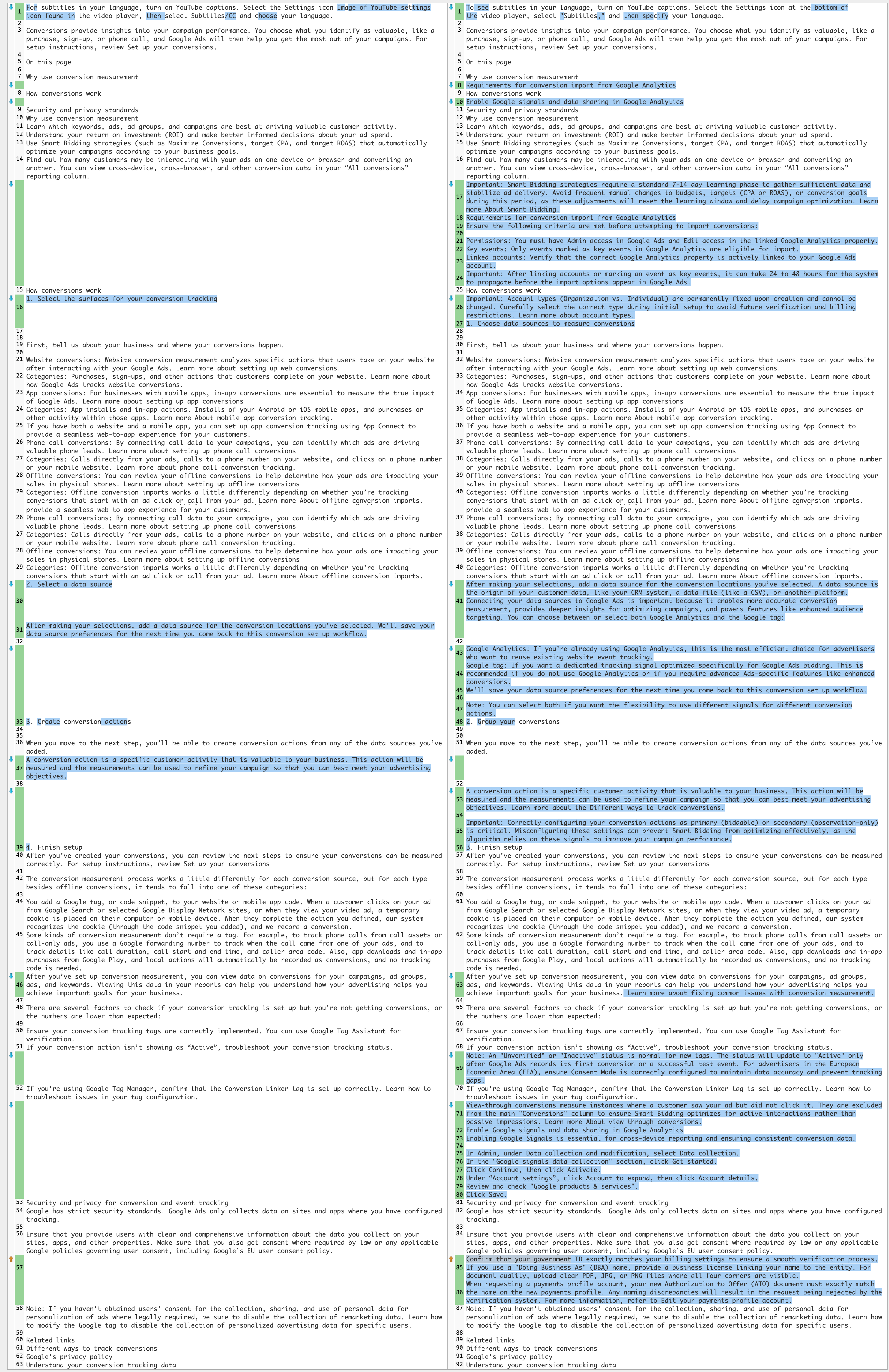
Here is what was added, and you can compare it to the old document over here:
- Important: Smart Bidding strategies require a standard 7-14 day learning phase to gather sufficient data and stabilize ad delivery. Avoid frequent manual changes to budgets, targets (CPA or ROAS), or conversion goals during this period, as these adjustments will reset the learning window and delay campaign optimization. Learn more About Smart Bidding.
- Permissions: You must have Admin access in Google Ads and Edit access in the linked Google Analytics property.
- Key events: Only events marked as key events in Google Analytics are eligible for import.
- Linked accounts: Verify that the correct Google Analytics property is actively linked to your Google Ads account.
- Important: After linking accounts or marking an event as key events, it can take 24 to 48 hours for the system to propagate before the import options appear in Google Ads.
- Important: Account types (Organization vs. Individual) are permanently fixed upon creation and cannot be changed. Carefully select the correct type during initial setup to avoid future verification and billing restrictions. Learn more about account types.
- After making your selections, add a data source for the conversion locations you’ve selected. A data source is the origin of your customer data, like your CRM system, a data file (like a CSV), or another platform. Connecting your data sources to Google Ads is important because it enables more accurate conversion measurement, provides deeper insights for optimizing campaigns, and powers features like enhanced audience targeting. You can choose between or select both Google Analytics and the Google tag:
- Google Analytics: If you’re already using Google Analytics, this is the most efficient choice for advertisers who want to reuse existing website event tracking.
- Google tag: If you want a dedicated tracking signal optimized specifically for Google Ads bidding. This is recommended if you do not use Google Analytics or if you require advanced Ads-specific features like enhanced conversions.
- We’ll save your data source preferences for the next time you come back to this conversion set up workflow. Note: You can select both if you want the flexibility to use different signals for different conversion actions.
- Important: Correctly configuring your conversion actions as primary (biddable) or secondary (observation-only) is critical. Misconfiguring these settings can prevent Smart Bidding from optimizing effectively, as the algorithm relies on these signals to improve your campaign performance.
- Note: An "Unverified" or "Inactive" status is normal for new tags. The status will update to "Active" only after Google Ads records its first conversion or a successful test event. For advertisers in the European Economic Area (EEA), ensure Consent Mode is correctly configured to maintain data accuracy and prevent tracking gaps.
- View-through conversions measure instances where a customer saw your ad but did not click it. They are excluded from the main "Conversions" column to ensure Smart Bidding optimizes for active interactions rather than passive impressions. Learn more About view-through conversions.
- Confirm that your government ID exactly matches your billing settings to ensure a smooth verification process. If you use a "Doing Business As" (DBA) name, provide a business license linking your name to the entity. For document quality, upload clear PDF, JPG, or PNG files where all four corners are visible.
- When requesting a payments profile account, your new Authorization to Offer (ATO) document must exactly match the name on the new payments profile. Any naming discrepancies will result in the request being rejected by the verification system. For more information, refer to Edit your payments profile account.
Those are the additions that I found in this document, but here is a side-by-side diff:
Forum discussion at X.