Navah Hopkins, the Microsoft Ads Liaison, posted a reminder on LinkedIn, encouraging advertisers to ensure the email settings are all configured properly. You can get monthly invoices, billing alerts, account notifications, ad and keyword rejection notices, optimization and performance tips and more.
Navah wrote, "I'm going to spend some time talking about a really underrated section of Microsoft Advertising: the Email settings section!" "You absolutely can get monthly invoices sent to you if you would prefer that over downloading them from the UI! Here are the steps to do that," she added.
Here are the steps:
1. Click on "Settings" on the left hand navigation bar. It should be second from the bottom and have a gear icon.
2. Click on "Email preferences" on the left hand menu. You may also choose to click it when you hover over "Settings".
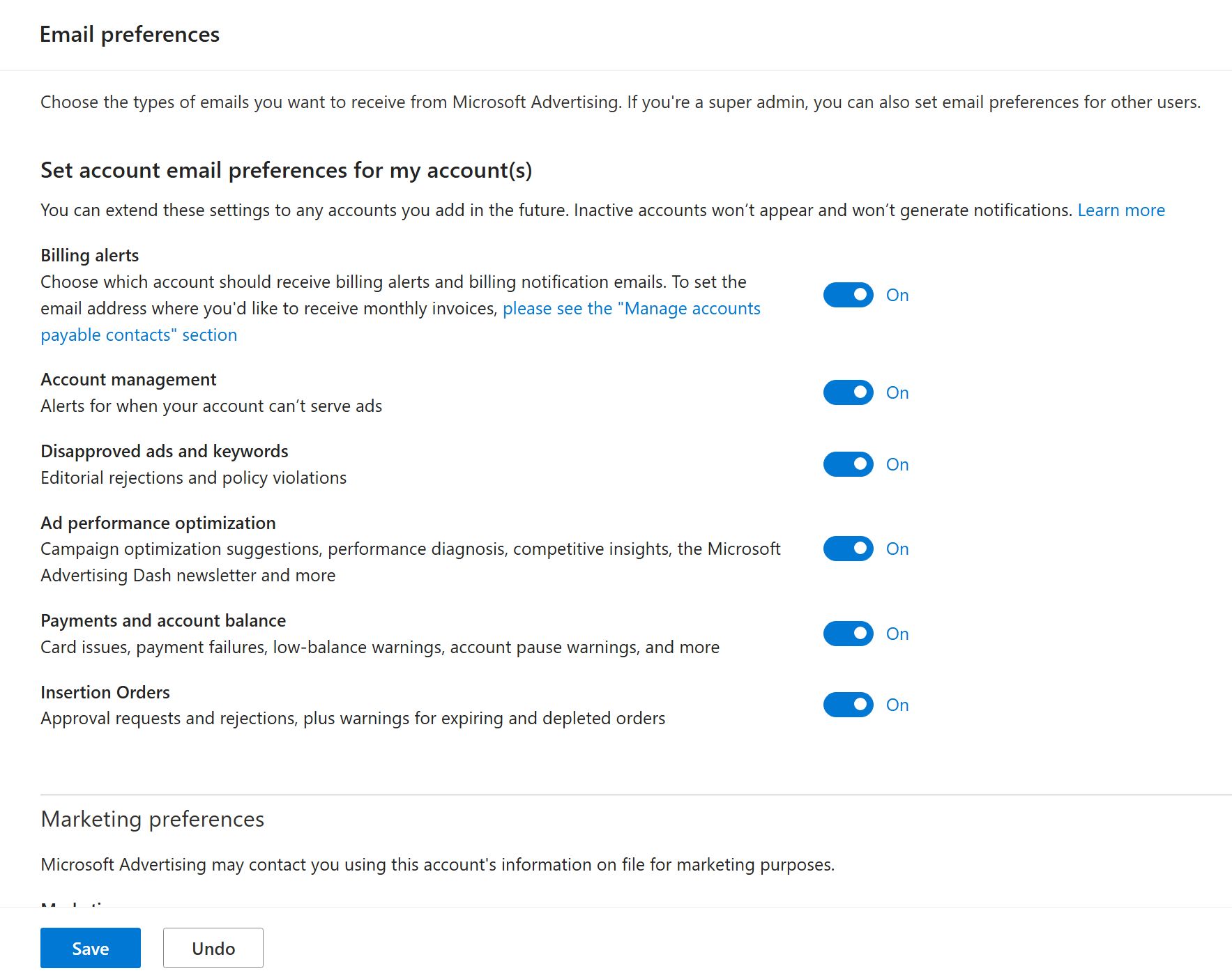
3. Billing alerts (i.e. monthly invoices) is the fist option. If it's toggled on, be sure to check your Billing settings for who is set to receive those emails.
4. Click the blue save button at the bottom to ensure any changes are locked in.
Here is a screenshot of the Microsoft Advertising email settings:
Forum discussion at LinkedIn.