
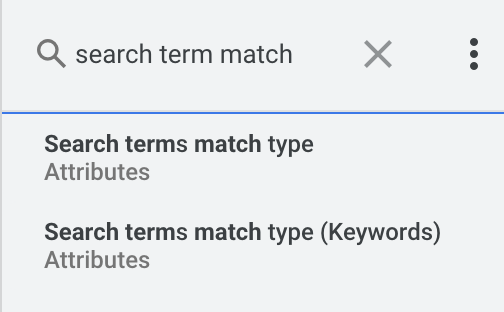
Ginny Marvin, the Google Ads Liaison, explained why the Google Ads interface has two different metrics named search terms match type. One is named "Search terms match type" and the other is named "Search terms match type (Keywords)."
Mike Ryan posted on X about this and wrote, "I sense a disturbance in the force." Heh... He said "Google has for some reason split search term match type into two metrics. The new "(keywords)" version only covers legacy vanilla match types & only for Search campaigns. AI Max & other campaign types are covered via the non-(keywords) version."
Here is his screenshot:
The Google Ads Liaison, Ginny Marvin, then explained what the differences are between the two - she said on X, "Those two fields map to two different places in the UI (and there’s one nuance to be aware of right now):"
- “Search terms match type (Keywords)” (the previous field, which we renamed for a bit more clarity) maps to the “Search terms match type” segmentation on the Keywords tab.
- “Search terms match type” is the newly added field that maps to the “Match type” column on the Search terms tab. Note that right now, you need to have the “Search term” column included in your Report Editor report for “Search terms match type” to return all match types (like AI Max); the team is working on a follow-up fix so it also returns all match types when used in summary tables without the “Search term” column."
Interesting to know...
Forum discussion at X.