
Google Ads posted a new help document about customer journey insights. "Customer Journey Insights is a new Google Ads Overview page reporting card pilot for eligible advertisers. It provides transparency into how your campaigns move users across conversion journey stages," Google wrote.
Google added that this card shows by default on your Overview’s Home page if your account is eligible. You can also add this card to any Custom views.
Google said the Customer Journey Measurement offers several key benefits including:
- Understand user movement: Gain transparency into how your campaigns move users through key journey stages to help you optimize budget allocation.
- Surface hidden long-term value: Measure how your campaigns drive long-term business growth, even if they don’t lead to immediate checkout conversions.
- Defend your marketing investments: Use comprehensive customer journey data to justify and protect your ad spend on campaigns that take more time to drive final sales.
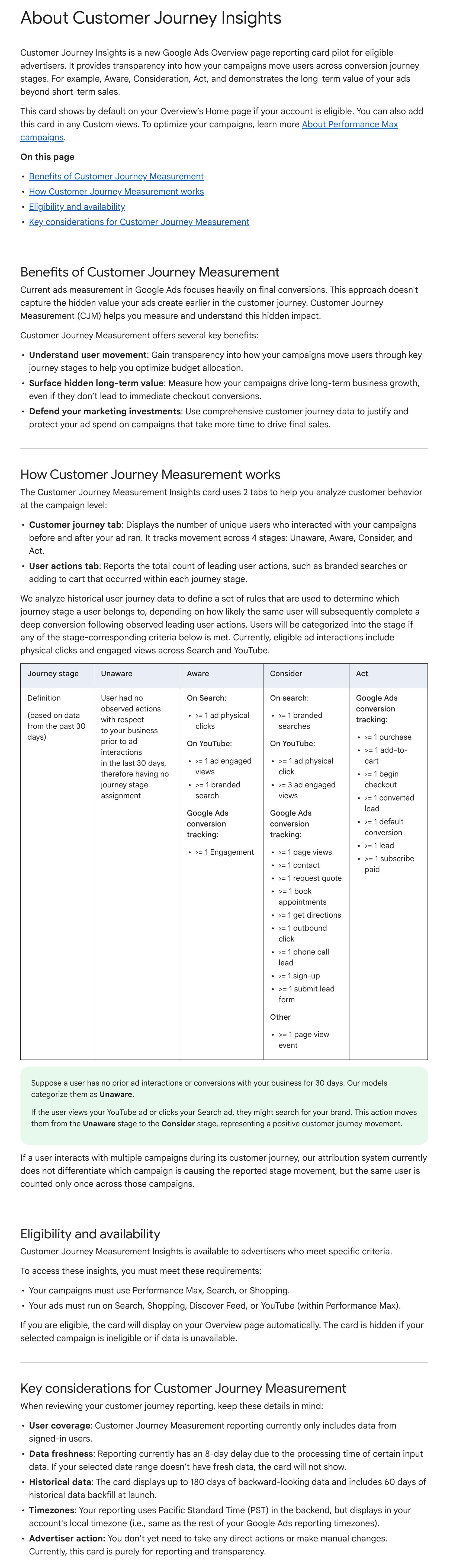
The Customer Journey Measurement Insights card uses 2 tabs to help you analyze customer behavior at the campaign level:
- Customer journey tab: Displays the number of unique users who interacted with your campaigns before and after your ad ran. It tracks movement across 4 stages: Unaware, Aware, Consider, and Act.
- User actions tab: Reports the total count of leading user actions, such as branded searches or adding to cart that occurred within each journey stage.
To access these insights, you must meet these requirements:
- Your campaigns must use Performance Max, Search, or Shopping.
- Your ads must run on Search, Shopping, Discover Feed, or YouTube (within Performance Max).
If you are eligible, the card will display on your Overview page automatically. The card is hidden if your selected campaign is ineligible or if data is unavailable.
Here is a screenshot of this help document:
Forum discussion at X.