If you login to your Google Webmaster Tools account, you may be prompted to add more sites to your account.
When I logged in this morning, I saw:
You have more sites!You're also a verified owner of these sites. Would you like to add them to your Webmaster Tools account?
This was followed by a list of domains and then two buttons:
- Add selected sites
- Always add
Here is a picture:
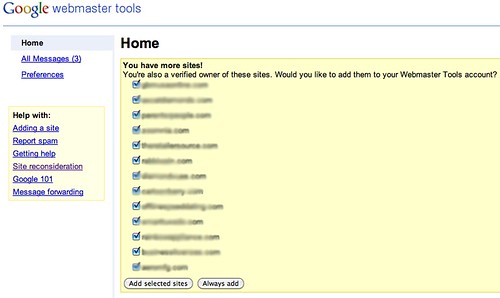
I should note that many of these were the non-www equivalent of sites I have already added to my Google Webmaster Tools sites list. It is best practice to add both the www and non www.
Forum discussion at WebmasterWorld.



Comments:
Brendan O'Connell
11/03/2010 12:25 pm
Yup, I got the same message when I logged in last night. Some for the non www version of sites I already owned.
Zeyad
11/03/2010 12:33 pm
yea i too had the same message. does the webmaster results show different results for a "wwww" and a "non www" site.
Alistair Lattimore
11/03/2010 12:43 pm
Who says it is best practice to add both www/non-www to your account? Conventional wisdom is to permanently redirect one of those to the other, why wouldn't you do that?
Barry Schwartz
11/03/2010 12:54 pm
Setting a preferred domain most of the time requires you to verify both non and www. See http://www.google.com/support/webmasters/bin/answer.py?hl=en&answer=44231
Robert Eisenstein
11/04/2010 03:11 pm
So what shou;d I do? Click OK?
Franchise Guy
11/09/2010 04:14 pm
I got the same message in GWT for the non-www versions of my sites. So the idea is to add both the www and non-www, so you can set the 'preferred domain' on both subdomains?
LinkChina Wholesale
04/25/2011 08:00 am
It is really an useful function.