Googlers Analyze Mobile Search Data | Main | Google Acquires Jaiku Microblogging Platform

How To Set Up Google AdSense Video Units Via YouTube

Yesterday I wrote about the launch of Google AdSense video units, but like I said, no one with an AdSense account was able to use the feature yet. As of last night that changed.

Here is a how to, on setting up Google AdSense Video Units via YouTube.

Step 1: Go to your AdSense Set Up Page and click on the YouTube (Video Units) option as pointed out in the image below:
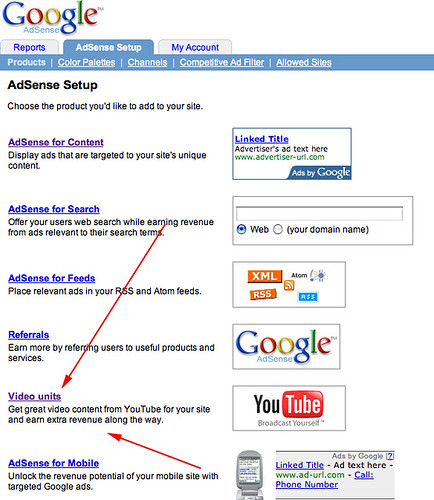
Setting Up Google AdSense Video (YouTube) Ads

Step 2: Agree to legal disclaimer (first time only):
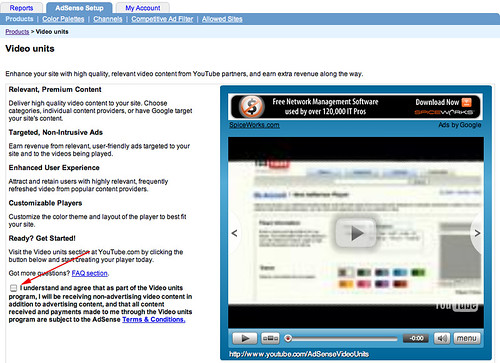
Setting Up Google AdSense Video (YouTube) Ads

Step 3: Confirm your AdSense account with YouTube (first time only). You are taken to YouTube after you agree to the disclaimer. This is where you plugin your AdSense account information, so YouTube and AdSense can communicate.
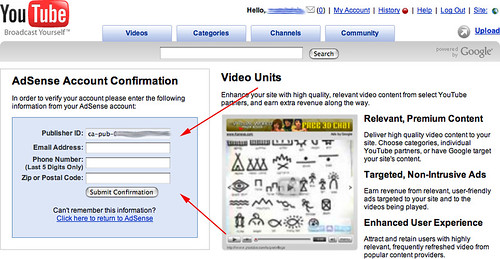
Setting Up Google AdSense Video (YouTube) Ads

Step 4: When that is done, it should tell you they have associated your account with YouTube.

Setting Up Google AdSense Video (YouTube) Ads

Step 5: Then you set up your first player. You define the player name and description, the layout and the colors also.
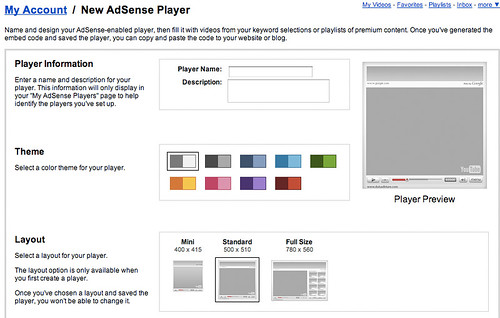
Setting Up Google AdSense Video (YouTube) Ads

Step 6: Define the content matching options. You can let Google figure out your content and provide relevant video ads, or you can help with hints or by specifying the content you want on your site.
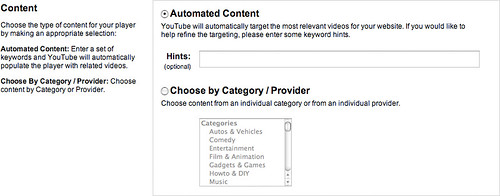
Setting Up Google AdSense Video (YouTube) Ads

Step 7:Then you just click the generate ad code:

Setting Up Google AdSense Video (YouTube) Ads

Paste the code into your page, like I did here below and you should see an add related to search stuff.

The next time you go to your Google AdSense set up page and click on video units, you will be taken to a page that shows you your old units and gives you the ability to create new ones or remove old ones.
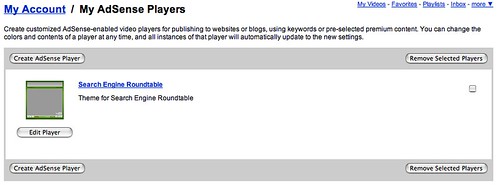
Setting Up Google AdSense Video (YouTube) Ads

That pretty much is the detailed walk through of how to set up Google AdSense Video Units for the first time.

Forum discussion at DigitalPoint Forums

.


Like The Story? Vote For It On Yahoo Buzz! Or On Sphinn!

posted rustybrick in Google AdSense at October 10, 2007 6:09 AM Comments (26)

Comments

Thanks for the guide but I think we could have figured it out.


I still don't get the option!


Me too Jordan.


i just get an error at stage 4 saying "The publisher must be associated with the developer account before the developer can invoke operations on the publisher's account" anyone know why it wont link the two accounts?


I get the same Error: "AdSense error: The publisher must be associated with the developer account before the developer can invoke operations on the publisher's account."
I was very careful to use the same info in my adsense account. "I triple checked" is an understatement. I have searched the net and everyone has this question but nobody has the answer.


The publisher must be associated with the developer account before the developer can invoke operations on the publisher's account.

Above Error ditto for me although all is well; email address, phone number, zip code. I find there is no answer on the web so far! OMG!

I don't think its got to do with browsers, there is something wrong with youtube.com or you must enable something somewhere in your ad sense account. I find that a lot of users are having this error, could some GURU save our time, please!!! What's the solution ?


For what its worth, I was having problems and finally figured out that the first email you "connect" it to Adsense is final. In other words, you can't sign up again under a different email; if you do, it never gets to the creator page. Once I remembered the account I originally signed up with it (when they first offered it), bam, it was all right there. Hope this helps.


where on youtube do you paste the code?


nice guide


Me too. I can't find video ads option on my adsense page.


i want to use add by google,but i cant


I dont get the option either.


hey im confused at one part. you say to paste it on your page, but how. someone please answer me.


Omar, you have to find a way to edit the html that underlies every page on your site. If your site was made by blogging software, there is usually an option somewhere in the settings that lets you see the code and paste something in.


I have not had much success with these units and have removed as my AdSense for Content earnings were getting lower!:(


i am from austria but i have dont in adsense panel youtube videos?


very nice information indeed.. this is fantastic for adsense publishers....

thanks for sharing


Why? outside US. Youtube& adsense noavailable. When I can get it?


im not have that option too..can someone teel me why??


I have set up video adsense units, but now can't edit them i just get taken to my account home page. Then if I select edit my adsense players it just loops me back to the account home page. Can anyone help?


hello.
Adsense Video is no longer available. it has been removed a long time ago from google. Read the adsense website.

See ya


When I go into the setup page, there is no section for video units. So I have no idea what to do. This whole process is so confusing it defies description!!!


I believe this option may no longer be available, I have looked all over both my adsense and youtube accounts and cannot find an option to intigrate the two.


Yap, Adsense doesn't have such option anymore!!


SO since this Option doesn't show anymore how are we suppose to get video ad's from adsense?


By Adsense setup i don't see Video units i have 5 products i can make.


Post a comment (Note: Can Take 120 Seconds For Your Comment To Show Up)

Do you want us to save your personal Information?


To subscribe to the Search Engine Roundtable, click here
