
Google is testing a new AI-powered configuration tool, as it calls it, to help you build instant reports based on your natural language questions. So basically Google Ads and Analytics Advisor but for Search Console, plus this just builds reports and doesn't do actions - yet.
Google wrote, "we're excited to announce an experimental feature in the Performance report designed to reduce the effort it takes for you to select, filter, and compare your data: AI-powered configuration."
The Google Search Console AI-powered configuration tool is an experimental feature that uses AI to customize the Search Performance report by requesting the data you would like to see. Instead of manually applying filters, comparisons, and selecting metrics, you can ask the assistant to configure the report for you and it should. So you are restricted to the filters that are available today, so no, you won't be gaining access to any new data, like AI Overviews or AI Mode.
"Powered by AI, this feature lets you describe the analysis you want to see in natural language. Your inputs are then transformed into the appropriate filters and settings, instantly configuring the report for you," Google added.
Note, I don't see it yet, it is "experimental" and is available for a "limited set of websites" but Google said it "will be gradually expanding it over time."
Here is a GIF of it in action:
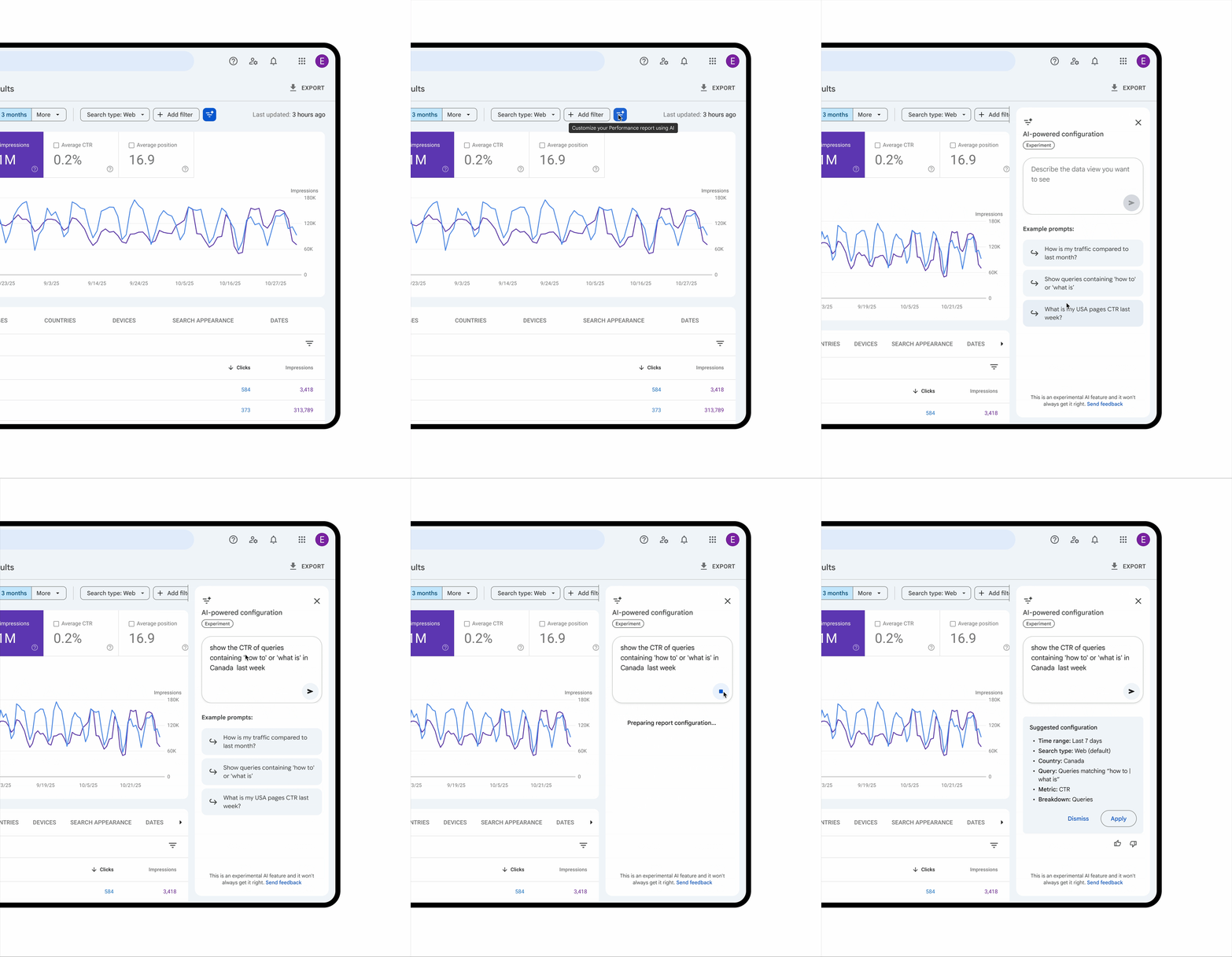
When you do get access to it, you are limited to 20 requests per day. Then here is how to use it:
(1) Click the filter icon in the Performance report header to open the tool in the side panel.
(2) Type your request into the prompt field. The tool will then suggest the corresponding filters, comparisons, and metric settings. You must then confirm the suggestion to apply those settings to your report.
Google does warn that this is AI, so it might not work properly and it might give you the wrong information. Google wrote, "Since this is an AI feature, the tool may generate filters that don’t match your request. Always review the filters applied to the report to ensure they match your intended query."
The AI-powered configuration feature is designed to streamline your analysis by handling three key elements for you:
- Applying filters: Narrow down data by query, page, country, device, search appearance or date range.
- Configuring comparisons: Set up complex comparisons (like custom date ranges) without manual setup.
- Selecting metrics: Choose which of the four available metrics—Clicks, Impressions, Average CTR, and Average Position—to display based on your question.
Here are some of the documented limitations:
- Scope: it supports only the Performance report for Search results. It is not available for Discover or News reports.
- Accuracy: AI can sometimes misinterpret requests. Always review the suggested filters to ensure they match your intention before analyzing the data.
- Limitations: The feature is designed for configuration (filters, comparisons, metrics). It cannot perform actions like sorting the table and exporting data.
You can learn more in this help document but again, you probably won't see this feature for some time.
Jimmy Hartill has access to this feature, which is neat, he posted screenshots on LinkedIn. So does Pedro and I asked him how he likes it:
Ha! That was fast
— Pedro Dias (@pedrodias) December 5, 2025
GSC AI-driven reports pic.twitter.com/F4AWpHSUrf
Also, it won't do any advanced regex for you. It applies basic filtering most times
— Pedro Dias (@pedrodias) December 5, 2025
Forum discussion at LinkedIn.