
A few weeks ago we reported on a new Google Business Profiles help document change that talks about the Collected Info action. Well, I have not seen it live yet and most have not, but we have a screenshot of what it looks like when it does go live.
Darren Shaw posted a screenshot of the feature on LinkedIn that reveals some of what this feature does - here is that screenshot:
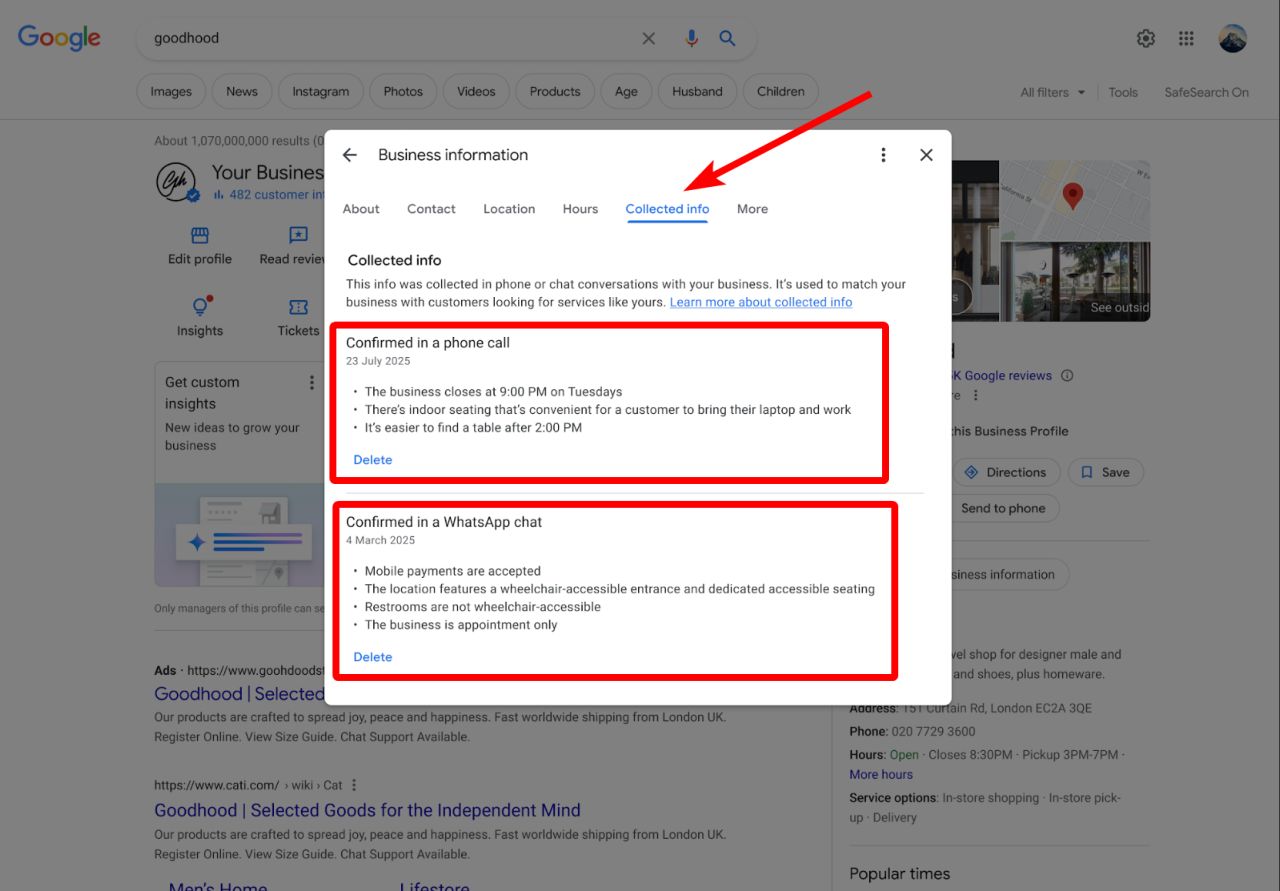
You will be able to access this when you Click on edit business profile, then click on "Collected info." From there Google said, "This info was collected in phone or chat conversations with your business. It's used to match your business with customers looking for services like yours."
Then it lists which information you can delete and how that information was collected.
It is nice that Google is being more transparent and giving more controls to business owners on this type of information. Sometimes, businesses would find changes to their information and have no clue how those changes came about.
Darren Shaw wrote:
A new Collected Info tab is rolling out inside the Google Business Profile dashboard, where business owners can:- See exactly what Google collected from recent calls
- Review whether the information is accurate
- Delete individual details from Google Search and MapsGoogle has been increasingly using AI and automated calls to keep Business Profiles updated.
Now, businesses finally have a clearer way to see what was collected and remove anything that is incorrect.
Lisa Landsman from Google also announced this feature a few days ago in the Google Business Profiles Forums and wrote:
[New] Manage collected info on your business profile To help local customers find you, Google may occasionally call your business using an automated assistant to verify everyday details—like whether you offer curbside pickup, have dedicated customer parking, or accept walk-ins. The big update? You are now able to easily review and manage this information directly from your Google Business Profile dashboard:- See What Was Collected: Click on the new "Collected Info" tab in your dashboard on Search or Maps to see a clear list of details gathered from recent calls.
- Instant Deletion: If you want to remove a piece of information from Google’s records, you can click "Delete" to remove it from Google Search and Maps.This new feature ensures that your business information is accurate and current. Read more in our help center article.
We just spotted it 3 weeks earlier.
Forum discussion at LinkedIn.
Update: A couple of months later, Google confirmed this:
You can now review details verified by Google’s automated assistant right inside your Business Profile dashboard. Head to the "Collected info" tab to see what was gathered and delete any outdated details.
— Google Business Profile (@GoogleMyBiz) September 14, 2026
👉 Learn more: https://t.co/HqLsmJY4dN pic.twitter.com/Wh9wff9J9F