
Google Ads is rolling out two new "controls" in the advertising platform named channel prioritization and budget allocation. These are rolling out globally across Google Search, Google Shopping, Performance Max, and soon Demand Gen.
We saw an alpha release of this back in August but now Google is rolling this out to everyone and it looks pretty similar, here is a GIF of the channel prioritization controls:
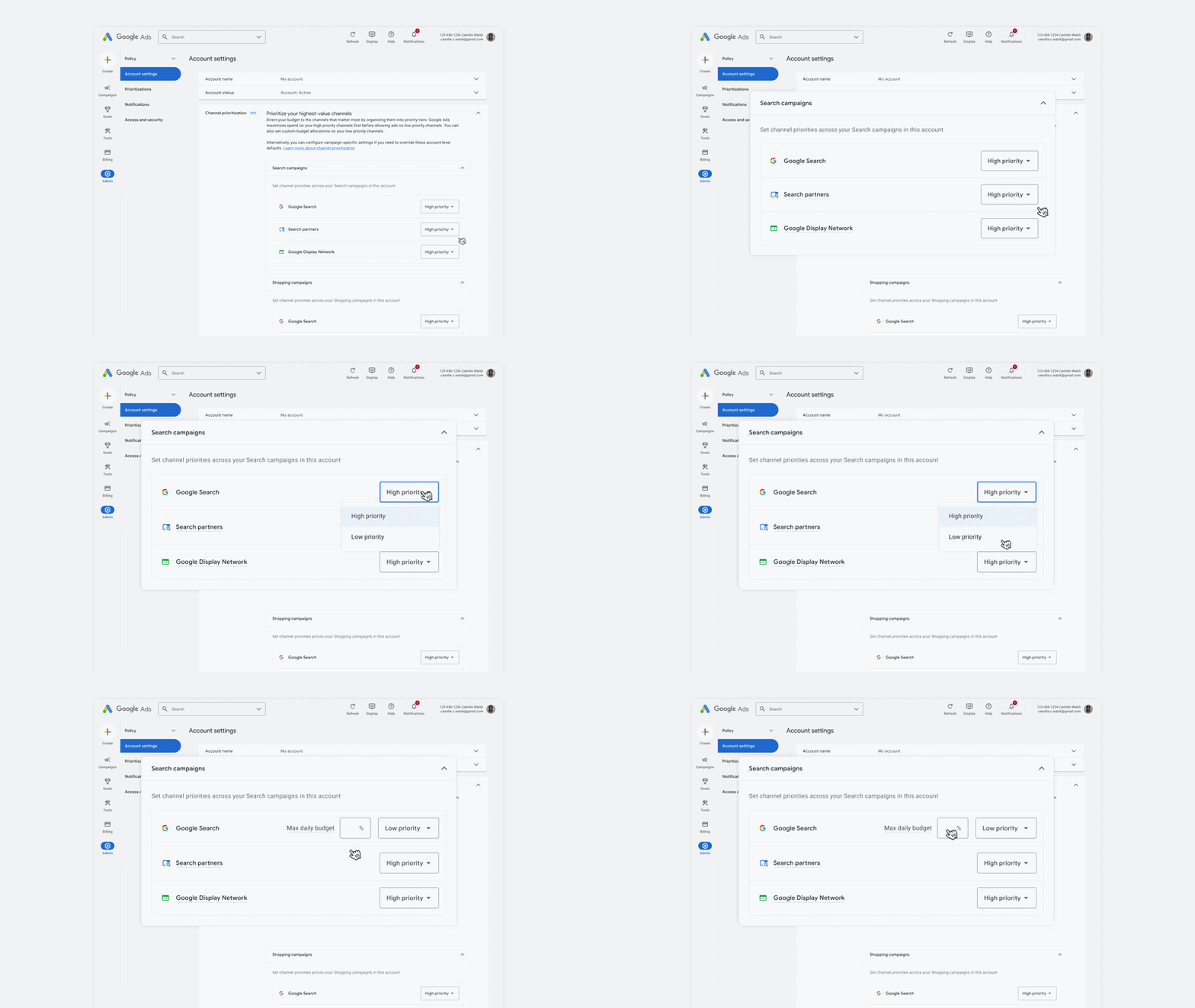
Channel prioritization:
Advertisers can now organize inventory into "High priority" and "Low priority" tiers with this new channel prioritization feature in Google Ads. Google will use its AI to fully fund high-priority channels first (within their target when using Target CPA or Target ROAS) before directing the remaining budget to lower-priority channels.
Based on the campaign type, the channel groupings you can adjust prioritization on the following:
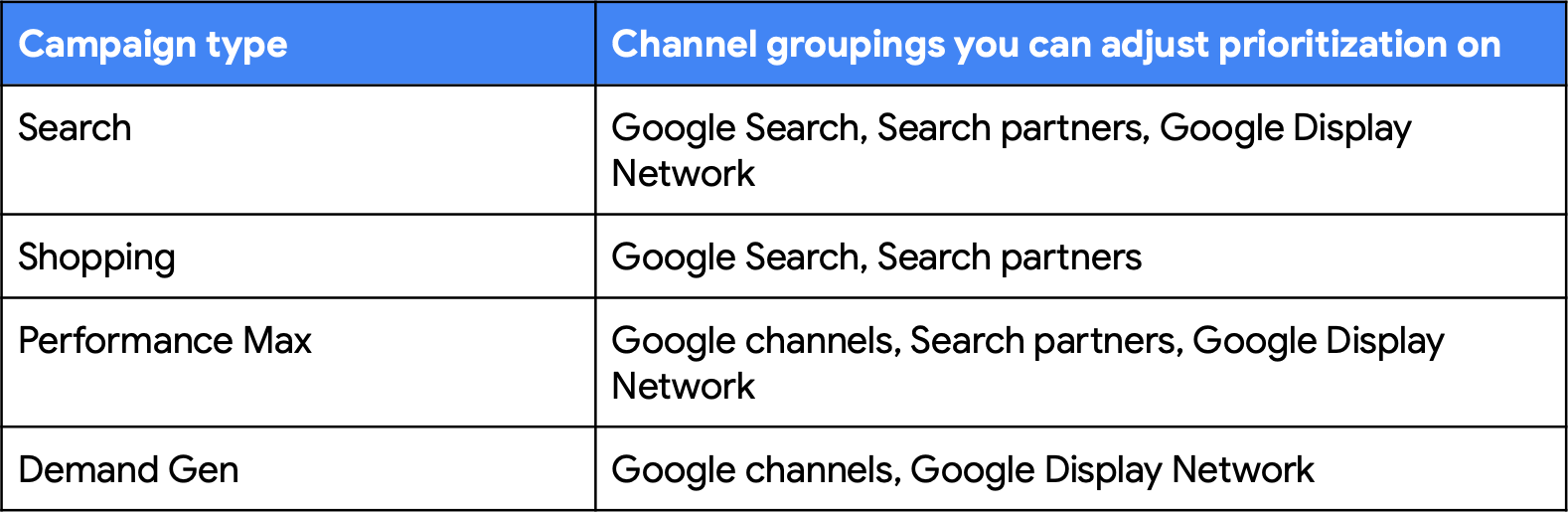
These controls are rolling out at the account and campaign levels, and also apply to shared budgets. Distinct priority tiers can be set across Search, Shopping, Performance Max, and Demand Gen campaign types, Google explained.
Budget allocation:
For channels set as "Low priority” advertisers can set an optional, percentage-based limit on your daily budget. This provides built-in spending guardrails, letting advertisers safely test and capture valuable reach without worrying about runaway spend or needing to opt out entirely.
Google wrote, "On a best-effort basis, our tools will aim to keep spend on those channels within that limit. This is particularly helpful for campaigns with Target CPA or Target ROAS bidding that are not limited by budget since channel prioritization alone will generally not have an impact there."
An important note, "Starting in February 2027, for Search campaigns with the Google Display Network turned on, the current spend allocation setup will go away, and advertisers may see a shift in channel spending. To keep their current configuration, they can set the Google Display Network to "Low priority" with a 50% budget allocation."
The help page should be over here. It says:
Channel prioritization and channel-level budget allocation help you better steer how your budget is spent, putting you in control of how Google Al helps you reach the right audience at the right time. Channel prioritization gives you more control over how your budget is allocated across channels. For example, in Search campaigns you can set Google Search, Google search partners, and the Google Display Network to different priority levels depending on what you value more. These controls are rolling out progressively to Search, Shopping, Performance Max, and Demand Gen campaigns over the coming months. Feature availability in your account may vary depending on campaign type and rollout timing.
It also says:
For Low priority channels where you may want even greater control, budget allocation lets you set a desired daily budget allocation percentage, so you can capture the benefits of these channels while still controlling how much you spend on them. If you've previously opted out of Google search partners or the Google Display Network, you can also use these controls to opt back in with more confidence about how your budget is allocated. For Low priority channels, you can set an optional daily budget allocation percentage as a best-effort limit on daily spend for that channel. This is particularly useful for campaigns that aren't limited by budget where channel prioritization generally won't impact your allocation.Budget allocation is calculated as a percentage of the campaign's average daily budget (for example, a 5% budget allocation on a $1,000 average daily budget means Google Al will aim to keep spend on that channel at or below $50 per day), not as a percentage of actual campaign spend. Budget allocation works on a best-effort basis: Google Al will aim to limit the spend on that channel to within the percentage of budget that you specified, but this isn't a guarantee, and daily spend on that channel may occasionally exceed your budget allocation. The allocation resets each day and unspent or overspent amounts don't carry over. For shared budgets, the allocation applies to the shared budget as a whole, across all campaigns that use it.
If you set an account default budget allocation, it applies to every eligible campaign of that type across the account, unless you set campaign-level or shared budget-level overrides. If a campaign currently spends more than that percentage on a Low priority channel, you may see a shift in spend on that channel after the setting is applied.
Set channel priorities once at the account level, and they apply to every campaign of that type unless you customize them for a shared budget or campaign. To set account-level priorities:
1. Go to your Account settings.
2. Locate the "Channel Prioritization" card.
3. Select the target campaign type (Search campaigns, Shopping campaigns, Demand Gen or Performance Max campaigns).
4. Assign priority tiers (High priority or Low priority) to each available channel.
• (Optional): For channels assigned to Low priority, enter a budget allocation percentage. This sets an upper bound on that channel's daily spend, based on your campaign's average daily budget.If you set a Low priority channel's budget allocation to 0%, Google won't spend on that channel.
5. Click Save.
Forum discussion at X.