Google Let's You "Lock" Safe Search, Well Kind Of

Nov 12, 2009 - 8:28 am 1 by
Filed Under Google

The Google blog announced you can now lock the SafeSearch filter to help prevent a computer from seeing adult or sexually explicit content in the Google images and results.

To do this, go to Search Settings and click on "Lock Safe Search." FYI, I personally do not see this option right now. But here is a video of how to set it up, when it is available:

Once Safe Search is locked, the Google pages should add these big colored balls to the right top portion of the screen. This way parents can keep an eye on their kids from a distance.
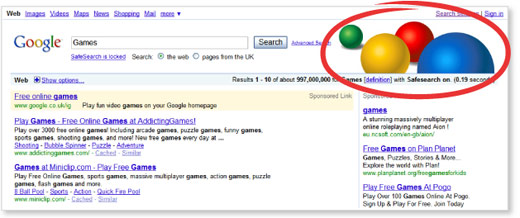
Google Safe Search Lock

Thing is, you need to lock this on all Google profiles that are on a computer and if someone deletes the cookie and adds this greasemonkey script, then the lock is disabled.

There are more details about this new feature at this help document.

Forum discussion at Google Web Search Help.

 

Popular Categories

The Pulse of the search community

Search Video Recaps

 
Video Details More Videos Subscribe to Videos

Most Recent Articles

Google Search Engine Optimization

Google Won't Use Sitemap Files If Its Not Convinced Of New/Important Content

Feb 23, 2026 - 7:51 am
Google

Google: A Spike In Impressions Doesn't Cause Problems For Search

Feb 23, 2026 - 7:41 am
Bing Search

Bing Tests New UI For AI Responses With New Links & References

Feb 23, 2026 - 7:31 am
Google Maps

Google Business Knowledge Panels With AI Generated Services

Feb 23, 2026 - 7:21 am
Google Maps

Google Email: Fake Or Incentivised Reviews Found On Your Business Profile

Feb 23, 2026 - 7:11 am
Google Search Engine Optimization

Google Search Console Page Indexing Report Missing A Chunk Of Data

Feb 23, 2026 - 7:05 am
 
Previous Story: Google Rich Snippets Coming To Smaller Sites?

