
Japanese Support for Google Docs & Spreadsheets

Mar 19, 2007 - 8:13 am 0 by
Filed Under Misc Google

A Google Groups thread reports that Google now supports Japanese in Google Docs and Spreadsheets. The Google Japan Blog has more details in Japanese.

If you want to test it, you can simply go to this URL but you will then have to change it back. More details on how to change it back is as follows:

1. After logging in to Google Docs & Spreadsheets, you'll be brought to your Active Docs & Spreadsheets list. From here, click on "Settings" (found in the top right-hand corner).

2. Under "General" (default), you have the choice to change your display language setting. Choose the display language you'd like.

3. Click "Save."

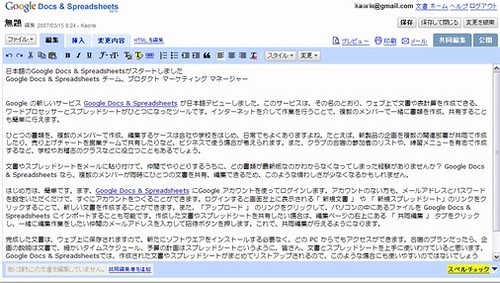
Here is a screen shot: Google Docs Japan
Forum discussion at Google Groups.


Popular Categories

The Pulse of the search community

Google Search Volatility

More Details

Search Video Recaps

 
Video Details More Videos Subscribe to Videos

Most Recent Articles

Search Forum Recap

Daily Search Forum Recap: June 10, 2026

Jun 10, 2026 - 10:00 am
Google Maps

Report: Rejected Google Review Replies - The Hidden Rejections

Jun 10, 2026 - 7:51 am
Google Ads

Google Ads Tests Blue Dotted Underlines Sitelinks On Sponsored Listings

Jun 10, 2026 - 7:41 am
Google

Report: Google Zero Click Searches To Open Web Fall To 27.6%

Jun 10, 2026 - 7:31 am
Google Search Engine Optimization

Schema.org Adds Usage Statistics For Schema Types

Jun 10, 2026 - 7:21 am
Apple Intelligence

Apple Updates Applebot Docs To Include Siri AI & AI Features

Jun 10, 2026 - 7:11 am
 
Previous Story: Possible Microsoft Live Search March Update?


