
The other day, Google introduced the new Google bar, which some hate and some love. But not everyone can see it.
A Google Web Search Help thread has users asking how they can enable the new Google bar. Currently, the new Google bar has not been rolled out to most users. I personally do not see it, but everyone should see it by the end of the week (at least, that is my guess).
If you cannot wait till then, Alex posted on How to Try Google's New Navigation Menu.
If you use Chrome, Firefox, Safari or Internet Explorer 8+, open google.com in a new tab, load Chrome's JavaScript console (Ctrl+Shift+J), Firefox's Web Console (Ctrl+Shift+K), Safari's Web Inspector (how to do that?) or IE's Developer Tools (press F12 and select the "console" tab) and paste the following code:
document.cookie="PREF=ID=03fd476a699d6487:U=88e8716486ff1e5d: FF=0:LD=en:CR=2:TM=1322688084:LM=1322688085:S=McEsyvcXKMiVfGds; path=/; domain=.google.com";window.location.reload();
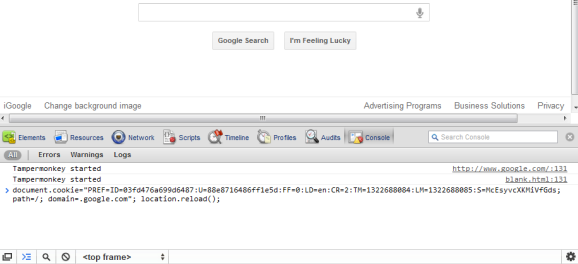
Then press Enter and close the console. If you're not in the US and you're using a different Google domain, replace ".google.com" with your domain in the code (for example: ".google.co.uk" in the UK). Please note that this only works for the English interface, so you many need to adjust the language in the preferences page.
So give it a try if you can't wait for the new Google bar.
Forum discussion at Google Web Search Help.


Comments:
Jrabma
12/01/2011 02:53 pm
How do I remove it, though? That is the question.
SiriusA
12/01/2011 03:06 pm
I think you just have to delete your cookies and refresh the Page. I have not tried it though.
Nick Stamoulis
12/01/2011 03:24 pm
The new Google bar is receiving mixed feedback. Some people are complaining that they just made a change with the black bar at the top. With the launch of Google+, Google has been changing the look and feel of its products so that they are better integrated with one another. This change provides a better user experience.
Sharuque Moideen
12/01/2011 03:54 pm
I din't get the update even though i install the cookie thing, i am waiting for google to roll out
Nokyati
12/01/2011 07:18 pm
I see and use Google bar but then back to the normal.
Ryan Butt
12/01/2011 09:07 pm
Not Working on FireFox 8 & Chrome 15
Sys Admin
12/01/2011 09:08 pm
Change scares people.....then the usually wonder what they did without it :)
travel agency
12/02/2011 06:56 am
It is not working on opera. But it automatically got opened in Mozilla. Do you think it could be effective? Thanks
Snoin_weodf
12/02/2011 07:23 am
That is great and all but how do i get rid of it?
David Nikolic
12/02/2011 09:19 am
It would look great and work better
Christy
12/02/2011 09:32 am
Has anyone gotten it yet?
Popa Prostu
12/02/2011 12:28 pm
dude, are you nuts? get a life!
Web Designer
12/02/2011 03:01 pm
I like the new Google bar. I saw it a couple of days back, someone in my office showed it to me. I like it.
Nnesin
12/11/2011 03:23 am
Thanks! works great!
Daniel milnes
12/17/2011 12:20 pm
remove the code
tehk knowledgeG
12/23/2011 04:30 pm
Does not work except on normal gmail accounts... for example... Google Apps for Domains accounts, doesn't work there :(
Boondoklife
12/28/2011 05:51 am
Check out this userscript, it will enable the new menu and allow you to customize the links it contains! http://userscripts.org/scripts/show/119530
Gilang Khairul Pratama
02/05/2012 05:19 am
WOW WORK PERFECTLY IN IE9 :D
Peter Slavchev
02/10/2012 03:42 pm
Not working anymore :(
andrew
02/12/2012 02:08 pm
rather than give me the drop down menu it gave me this new sort of menu, similar to the one before the drop down one but with bigger spacing, and no red line above the things like web and images. And the fonts a little thicker.
Somik Datta
02/18/2012 11:42 am
not works since a week
