Yesterday, if you viewed a video on YouTube in HD format, it would display in a large format. It would basically move down all the content on the right of the video and increase the video size to the full browse width. Here is a picture:

YouTube seemed to have changed it now. When you view a video in HD, it no longer increases the video size to the full width of the browser, instead it just keeps the current video size. Here is a picture:
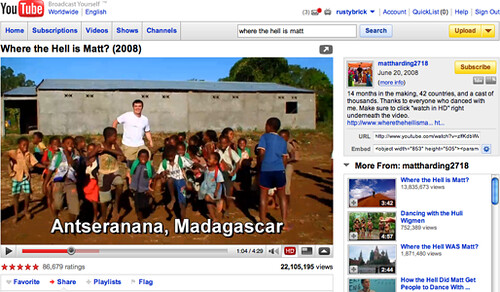
I am not sure if this is a bug or a feature, but it is being noticed by several YouTube viewers. A YouTube Help thread has a couple people complaining about the change.
The way to force the full width, is to append &hd=1 to the end of the URL, so for my last video recap: https://www.youtube.com/watch?v=XS0tTyJG9SA&hd=1.
Also, YouTube has increased the file size limit from 1GB to 2GB the other week. In fact, I was the first to notice this change, and some sites credited me, while others did not.