A High Rankings Forums member wonders if there's a way to check how many links are on Wikipedia. A few people say yes, you can. Some possible methods of exploration include the linkdomain:yoursite.com site:wikipedia.org or Google Webmaster Tools. But Barry, our savior, gives the most authoritative answer yet:
To see your links from Wikipedia (nofollowed or not followed) go to:
Here is an example search of our links in Wikipedia.
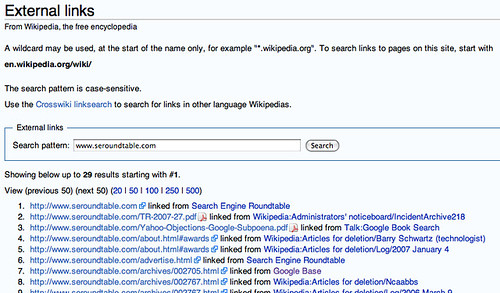
Nice. If you didn't know that existed, now you do. :)
Forum discussion continues at High Rankings Forums.
Editors note: Tamar wrote this post, but I made changes to links and added some more information.



Comments:
Judd Pickett
11/16/2007 03:43 pm
Great tip. Now I can get rid of the spreadsheet I was using to track all my self promoted wiki entries ;)
gabs
11/16/2007 04:03 pm
Now I can remove all my competitors links hehehehe :D lol
Barry Schwartz
11/16/2007 04:05 pm
gabs, lol!
Jonathan Dingman
11/16/2007 04:27 pm
Barry, Gabs is actually on to something there. I've done this for a few of my sites by removing my competition because they either got there links there in a sneaky way (and do not comply with the Wikipedia policies) or some how are irrelevant to the article. It's a good way to help decrease the competition :)
Barry Schwartz
11/16/2007 04:36 pm
Jonathan, Oh, I know...
Main Uddin
06/24/2012 01:54 am
Thanks for the share the valuable article.As it is mentioned that my blog has 47 links in wikipedia but none of those has included by me.How they entered in wikipedia ?
Shazida Khatun
06/24/2012 01:56 am
Main Uddin @ It better to mention your site url with out http thus we can check it for trust worthy ness.
Main Uddin
06/24/2012 01:58 am
Any one can check it in Wikipedia as umain30.com