Google just released a new feature for AdWords advertisers. Advertisers can now specify if they do not want their ads to show up for specific IP addresses.
Why is this useful? A few reasons. Let's say you know a competitor is clicking on your ads, you can block their IP address and they won't even see your ad. Even if they are not clicking on your ads, you may not want them to see your ads, so you can also prevent that. Another reason is if you search for your keywords a lot but don't click on your own ads, and you do not want it to impact your click through rate, you can also block your own IP address from seeing your own ads.
How do you see it? Go to tools and then click on IP Exclusion, then select a campaign and there you go.
You should see this:
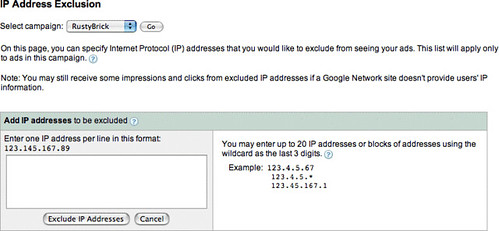
The AdWords help section adds that you can block up to twenty IP addresses or ranges of addresses, per campaign. "All ads in the campaign are prevented from showing for users with the IP addresses you specify, so we recommend you choose your list carefully."
Of course, if people are using dynamic IP addresses, this may get a bit tricky.
Finally, "Note: You may still receive some impressions and clicks from excluded IP addresses if a Google Network site doesn't provide users' IP information."
Forum discussion at WebmasterWorld.