
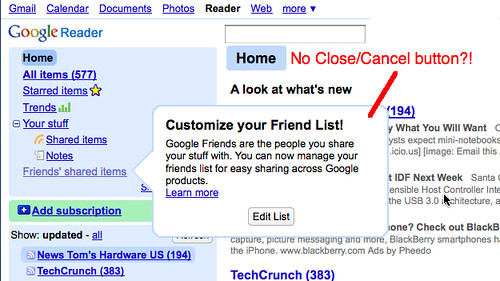
Google has announced a new Google Reader feature that lets you share your blog posts with friends -- separate from your Gtalk contacts. Here's an example screenshot of what it looks like:

Google is really excited about this, and so are users. They are even ready for more -- sharing specific folders with specific friends, having a conversation with their friends, etc.
One big concern, however, is the fact that Google has pushed this too hard without giving users the ability to close the window. The screenshot explains:
 (Photo from jaymeydad)
In subsequent threads (like this Google Groups one), forum members call the push a bit too much and consider that bubble a "pesky" one that won't go away -- there's no "close" button, as illustrated. Google Reader Guide has acknowledged the problem and said that the best way to remove the bubble (for now, until they fix it) is to hit "Edit" and then "Cancel."
Thanks for your feedback on this. Just to let you know, we now recognize that this is a potentially annoying way to introduce our new enhanced sharing features. We're working on making the decision to share items, if and when you're ready, easier and less intrusive.
Update 08/15: Google has listened. A Google Groups thread announces that you can now easily close that box.
Forum discussion continues at Google Groups (#1) and Google Groups (#2).