
Google AdWords Editor Users Report Statistics Issue | Main | Banned in Google Adsense? Appeal vs. New Account

Google Faces Class Action Suit Over Ambiguous Google AdWords Input Box

InformationWeek discusses a recent lawsuit that Google is facing over some ambiguity in an ad.
Google CPC Lawsuit
(Photo courtesy of Valleywag)

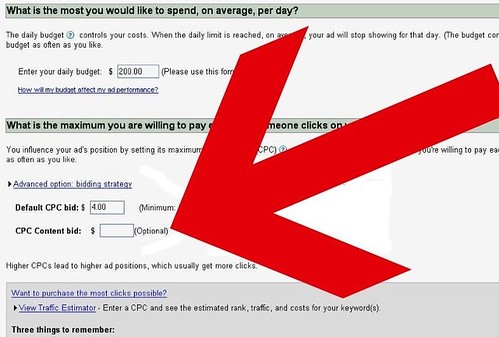
More specifically, from the image above, you see that there are 2 boxes. If you leave the second one blank, it doesn't imply that the amount is zero. Google implies that you're using the Default CPC bid for the second box if left empty.

Understandably, some forum members are thinking that Google is in the wrong here. It may not warrant a class action suit, but it still warrants something. In general, Google's CPC input boxes have been a problem before -- one forum members says that if you miss a decimal point (e.g. you set your ad to $015 instead of 0.15), you could end up paying a LOT more than you intended to.

Other forum members believe that this is linkbait at its best and that Google AdWords has help documents explaining all of these fields. If you don't read the fine print, you shouldn't hold Google liable that you've lost money. You should also not "test and forget" your ads; if something looks fishy, stop it before you lose money inadvertently.

Forum discussion continues at WebmasterWorld.


Like The Story? Vote For It On Yahoo Buzz! Or On Sphinn!

posted Tamar Weinberg in Google AdWords at April 24, 2008 9:45 AM Comments (4)

Comments

Is this really that much different from the fact that content match is set to "on" by default upon starting a new campaign? I've always wondered what the overall $$ difference would be to Google if every campaign ever created were set to "content match off" by default.


Could you let us know the steps to get to that page settings on Adwords?

Thanks,


I believe that shows up on your basic settings, Mary. I grabbed the screenshot without logging in, so I can't give you the exact steps! Sorry!


Mary, you can access your "campaign settings" by clicking on any campaign and clicking on the "Edit campaign settings". Of course, you have to be logged into your account to access this.


Post a comment (Note: Can Take 120 Seconds For Your Comment To Show Up)

Do you want us to save your personal Information?

Premium Sponsors + advertise

To subscribe to the Search Engine Roundtable, click here

