
Google Finally Brings Back "Report Offensive Image" Link

Oct 19, 2010 - 8:40 am 1 by
Filed Under Misc Google

After the launch of the new Google Image search, Google left out one quick feature, the ability to report offensive images found in Google Image search. I am glad to say, the feature has now returned.

Here are pictures of how it works:

Click on the "SafeSearch" link on the right of the Google Image search box. Select "Report offensive images."
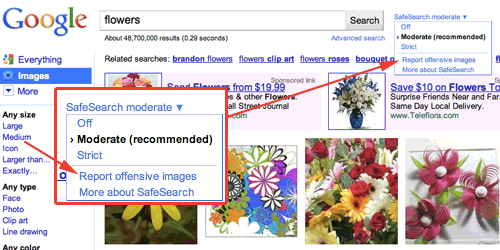
report google image back

Then "report" buttons will be added to the images on the page.
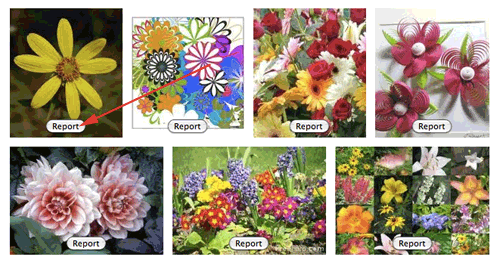
report google image back

Clicking on the "report" button will fade out the image and send a note to Google about the image:

report google image back

I am not sure when it returned, but I believe it is recent.

For older pictures, see this link.

Forum discussion at Google Web Search Help.

 

Popular Categories

The Pulse of the search community

Google Search Volatility

More Details

Search Video Recaps

 
Video Details More Videos Subscribe to Videos

Most Recent Articles

Search Forum Recap

Daily Search Forum Recap: June 8, 2026

Jun 8, 2026 - 10:00 am
Google Updates

Google Search Ranking Volatility This Weekend - Around June 6th

Jun 8, 2026 - 7:55 am
Google Search Engine Optimization

New Google Document On Third-Party SEO Tools, Services & Advice

Jun 8, 2026 - 7:51 am
Google Search Engine Optimization

Google Updates Its Hiring An SEO Doc Warning On SEO Tools & AI Optimization

Jun 8, 2026 - 7:41 am
Google

Google Search Profiles Insights & Analytics

Jun 8, 2026 - 7:31 am
Bing Search

Bing Gives Searchers A Way To Disable AI Copilot Answers

Jun 8, 2026 - 7:21 am
 
Previous Story: Google Sitemaps URLs Can't Handle Diacritical Marks

