
YouTube Annotations in Action

Jun 9, 2008 - 7:12 am 1 by
Filed Under Misc Google

The other day, I mocked Matt Cutts, by editing a video that caught him saying, "I watch porn all day." I did the video editing while sitting in the session, so the editing is subpar, to say the least.

How can I improve it? Well, I can annotate the video. YouTube now allows video annotations and here is how it works.

(1) Upload your video (2) Wait for it to be processed and live (3) Go to my videos (4) Click on "edit annotations" button on the right hand side of the video listing and you should see:
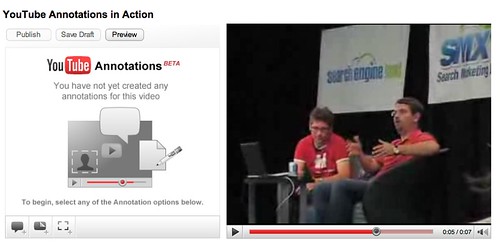
YouTube Video Annotations

(5) Use the interface to make your annotations (timing, balloons, etc):
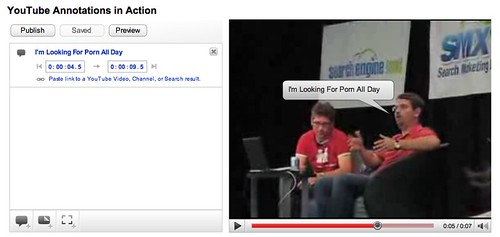
YouTube Video Annotations

(6) Preview, adjust, preview, adjust and so on (7) Then publish.

Whala, my new video:

More information on YouTube video annotations over here.

Forum discussion at WebmasterWorld.

This post was written last week and scheduled to go live today.

 

Popular Categories

The Pulse of the search community

Google Search Volatility

More Details

Search Video Recaps

 
Video Details More Videos Subscribe to Videos

Most Recent Articles

Search Forum Recap

Daily Search Forum Recap: June 8, 2026

Jun 8, 2026 - 10:00 am
Google Updates

Google Search Ranking Volatility This Weekend - Around June 6th

Jun 8, 2026 - 7:55 am
Google Search Engine Optimization

New Google Document On Third-Party SEO Tools, Services & Advice

Jun 8, 2026 - 7:51 am
Google Search Engine Optimization

Google Updates Its Hiring An SEO Doc Warning On SEO Tools & AI Optimization

Jun 8, 2026 - 7:41 am
Google

Google Search Profiles Insights & Analytics

Jun 8, 2026 - 7:31 am
Bing Search

Bing Gives Searchers A Way To Disable AI Copilot Answers

Jun 8, 2026 - 7:21 am
 
Previous Story: An Updated List of Google's Data Centers

