Google has been rolling out a new AdSense feature that you can likely see by going to the "Ad Setup" screen and clicking on the "Competitive Ad Filter" link. Then you should see access to the "Ad Review Center" (aka ARC).
It gives you more granular control over the ads displayed on your site. Here is a screen capture:
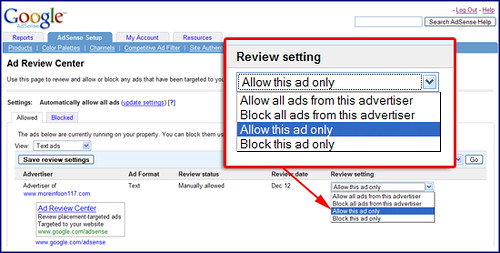
But it does not work exactly like the "competitive ad filter." In fact, in a WebmasterWorld thread, AdSenseAdvisor confirms that if you block an advertiser in the Ad Review Center, it will not block that advertiser from showing up in the contextually relevant area. So, it will only allow you to block ads for placement targeted ads and not contextually targeted ads. Here is more Q&A from AdSenseAdvisor:
There is no limit on how many ads/advertisers you can block in a session.An ad group is either placement or contextually targeted. If you block a placement-targeted ad, it will not then appear on your site as a contextually-targeted ad.
If you add a site to your Competitive ad filter, ads for this site will not appear in your ARC.
Forum discussion at WebmasterWorld.