
The Google Docs Blog has announced that there has been an update to Google Docs that allows you to freeze columns and share information on forms. To be more specific, they say:
We're really excited to bring you forms! Create a form in a Google Docs spreadsheet and send it out to anyone with an email address. They won't need to sign in, and they can respond directly from the email message or from an automatically generated web page. Creating the form is easy: start with a spreadsheet to get the form, or start by creating the form and you'll get the spreadsheet automatically.Responses are automatically added to your spreadsheet.
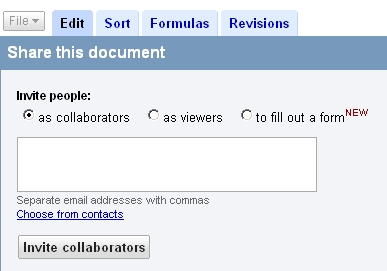
When you decide to share a spreadsheet, you'll be able to select the form option as shown below:
Google has also launched a feature that allows you to freeze columns. The illustrated instructions on how to do this are outlined here.
Additional changes, including image insertion features and improved chart labeling, are also released in this update.
Forum discussion continues at Google Groups.


