Yahoo Search October 2007 Update | Main | Halloween 2007 & The Search Industry

Set Geographic Target in Google Webmaster Tools

Let Google Know The Geographic Location of Your Site from Vanessa Fox at Search Engine Land has nice coverage of Google's new Set geographic target feature in Google Webmaster Tools.

In short, if your site is tailored to a certain geographic location, you may want to use this feature. Google says, "If your site is targeting users within a particular geographic area, please provide us with the relevant information below, using only the fields that apply to your target audience."

Clarify, it is not to tell Google. Hey, Google, my site is hosted in Canada. It is to say that I am trying to target users who are based in this specific location. So your site can be hosted anywhere, Google won't care, Google will learn that you are trying to target a specific location by you setting this feature. If you are a travel site, be careful when using this, because I am sure people in New York, looking to vacation in Spain, won't be searching for "Spain Vacations" while sitting in an Internet cafe in Spain.

To get to this feature, login to Google Webmaster Tools, click on "tools" and then click on "Set geographic target." You should see:
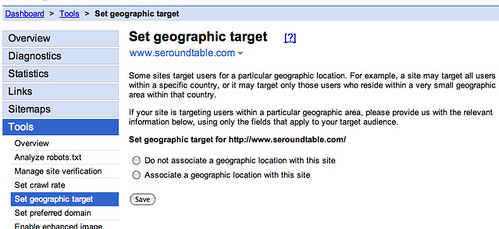
Set Geographic Target in Google

Specify your preference, and if that means, you want to specify a geographic target, you will see this:
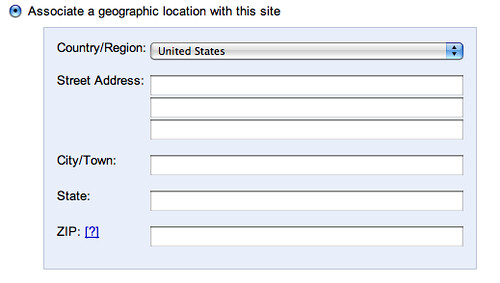
Set Geographic Target in Google

Yes, you can get as granular as the street address you want to target.

Forum discussion at WebmasterWorld and DigitalPoint Forums.



Like The Story? Vote For It On Yahoo Buzz! Or On Sphinn!

posted rustybrick in Google Optimization at October 31, 2007 7:30 AM Comments (17)

Comments

so how do we think this is going to work?

Is it going to increase your relevance to a term if the user is searching within your geographical area? Or the opposite whereby your relevance to searches outside the set geographical area is lowered?

I have a site that is based within the UK but because of the European Union it is also relevant to users within EU countries.


Let us know... I assume if you set it, it will weigh you more relevant in those specific regional searches.


Barry I think your assumption would make sense, it just gives google an idea where you think your target audience is and responds accordingly.

But don't you think it's possible that Google will change your weight for searches outside the set region?

By specifying the geographical area that your site is relevant to, surely you are admitting that you are not as relevant to terms outside that area that your site currently features in?


"But don't you think it's possible that Google will change your weight for searches outside the set region?"

Yes, I do. That makes logical sense.


I wish we didn't have to always assume with Google. Why can't they tell us exactly what would happen if we do this? Maybe use some examples or case studies and how it works?

We could have a mad scramble of people doing this soon and then crying because they lose a bunch of traffic from other regions that they are not directly targeting. I can hear them now.


I was just looking into setting our Geographical location but the info Google provided was vague about exactly what it will do. I think I may try it out on a crap/unused site and see what kind of outcome i get.


I'm primarily targeting a county in florida but since it is a tourist destination, I'd like users from other countries to be able to see it as well. Hm - this is confusing.


"I'm primarily targeting a county in florida but since it is a tourist destination, I'd like users from other countries to be able to see it as well. Hm - this is confusing." - Kenneth Udut. Simple, just do not set the location. From what you've just said, it is tourist related, thus people from outside county X in Florida could well be searching for it.

IMO, I would not set a targeted location in the tourist industry unless you specifically want tourists from location X. If not, leave it alone.

I would and DO however use on a client that has a large UK eCommerce site. Targeted audience - UK, thus set to UK... Sales from outside the UK are marginal. However, after setting the location to UK, there has been no decrease on Google.com (checking this from IPs abroard) but there has been benefits in Google UK and searching Google.com from UK IP.


I think it is a good idea to set this if you are indeed getting most of your business from a certain area as it will boost your listing for that area. i.e. would you rather have more clients who purchase than those annoying clients outside your region who don't


I set this up for a website the day after it was released and still cannot see a presence in the country that I selected. Surely this is the whole purpose of the tool? If I have a .com tld and host the site in India but want to target the Australian market this tool should help me out!


I nearly set the Geographical Location thinking that this might help but decided after reading this that I'll just leave it be.

Thanks for the info.


i have set geographic target to my own projects using google webmaster tool but it is not working properly


Its a useful step for some, not for all. A second, more robust step for those wanting to geo target their store or service area, is to use 'point of interest' data from seogis.com, especially if you want to 'ride-the-coat-tails' of local, more prominent points of interest/attraction.


Google has made some changes. Now you can set Geographical Location from setting.


Hi there.
I have a fun domain that ends with .ru and google automatically associated it with Russia but it has nothing to do with Russia, the content is english. unfortunately in the back end I can't change the association, pelase see screenshot :-(
http://screencast.com/t/f9waX1y5
Please help, how can I get rid of this ridiculous association?

Hi there.
I have a fun domain that ends with .ru and google automatically associated it with Russia but it has nothing to do with Russia, the content is english. unfortunately in the back end I can't change the association, pelase see screenshot :-(
http://screencast.com/t/f9waX1y5
Please help, how can I get rid of this ridiculous association?

http://screencast.com/t/f9waX1y5


Per page submission possible?


I have an investment property website www.eliteglobalproperty.com and although our office is based in China, our clients are based globally and I would like the default location for the site to be UK. Please can you tell me where we change the settings?


Post a comment (Note: Can Take 120 Seconds For Your Comment To Show Up)

Do you want us to save your personal Information?

Premium Sponsors + advertise

To subscribe to the Search Engine Roundtable, click here